
1.Form Operability and Visibility 【Update】
TPiCS-X Ver 5.2 pursues an intuitive and high-speed operating environment since the system was modernized with WPF. The latest rendering technology allows the system to display text and icons with high clarity, even on monitors with high resolution, such as 4K. Selecting a data line shows a blue underline, which allows the operation point to be identified at a glance; in addition, calculation and display processing are performed extremely quickly due to the optimized internal processing.
■ Flexibly extracting and organizing information
Simple search 【5.0】:You can execute searches quickly using a total of 8 types of condition settings, including exact match, partial match, negation, and conversion match based on converted values shown on the screen.
Quick Search 【5.0】:You can execute for an item in the background while typing, quickly identifying the target item from massive masters.
Detailed filter panel 【5.0】:You can intuitively perform complex data extraction by combining multiple search conditions with “and” or “or.” It also supports nested filter conditions, allowing for advanced data extraction.
Saving and calling conditions 【5.0】:A frequently used condition can be saved and shown as a separate filter button at the top of the screen. Simply clicking the button allows you to extract an item under conditions such as “To be Started Today” or “Unanswered Orders” for a particular person in charge.
Flexible layout change 【5.0】:You can sort data by any item, change column order by drag and drop, and fix the display of specific columns.
Grouping function 【5.0】:You can instantly group data by any item, such as customer and delivery date, showing a hierarchical tree for an overview.
Σ (Sigma) aggregation 【5.1】:This function instantly calculates the sum, average, maximum/minimum values, and number of numerical values on the grid. TPiCS-X Ver. 5.1 and later can aggregate values being displayed by the conversion display function (e.g., converting milliliters to liters) by simply clicking the [Σ] button.
■ Data editing and display settings common to all forms
Batch data conversion:This function can rewrite specific items in batch in multiple data on the grid. It allows for applying "addition" and "multiplication" to original values, allowing for adjusting quantity flexibly and shifting delivery dates, which reduces the man-hours required for data entry.
Batch data deletion:Unnecessary schedule details and sales order data can be deleted in batch, allowing you to clean data swiftly.
Batch operation of multiple records 【5.0】:You can add, copy, and delete multiple data in batch using the right-click menu, reducing the effort required for registering massive masters and changing schedules.
Bulk setting for grid operation and display 【5.0】:This function allows you to set in bulk the screen display magnification and adjust the column widths to best fit the data. Optimal layouts matching the monitor environment in use can be quickly applied to all users.
2.Item management and bill of materials (BOM)【Update】
The system integrates all control elements in the manufacturing industry as items, providing high flexibility.
■ Flexible modeling and structure settings
Abstraction of items: Not only products and parts but also actions (work, process, transfer, supply) can be defined as items.
Utilization of phantom items:You can define items that appear on the BOM but do not require work instructions for the site. It can be used for grouping parts for easier management; in addition, "phantom manufacturing lead-time" can be applied, allowing for developing schedules in consideration of the time axis, even for intangible structural groupings.
Shipping fee management 【NEW】:Transportation fee, packaging cost, and other expenses can be managed as expense items without inventory control. By linking shipping fees to sales order data or purchase order data, the movement of things and money can be separated while accurately reflecting them in sales and purchase amounts.
Detailed settings of used quantities:Three types of settings are available: normal used quantity, "divided used quantity" that eliminates rounding errors, and "fixed used quantity" that reflects setup loss, etc.
Settings by manufacturing location and revision management:Different child items and used quantities can be set for each production location (in-house manufacturing, outsourcing, or sites). Design changes, etc. can be handled as revisions for version management.
Individual retention of withdrawal details 【5.0】:If the same child item of a parent item is used in multiple places, they are retained as independent withdrawal details without being aggregated, achieving accurate tracing.
■ Design changes and switchover management
Running change (switchover master):By registering old and new part codes in the Switching Master, the system calculates the depletion timing of inventory and already arranged items. It automatically switches to the new part when the inventory is depleted.
Alternative production option【5.0】:When a part is out of stock, a production schedule of designated substitutes can be developed using the future calculated inventory, allowing for flexible responses that match the actual arrangement.
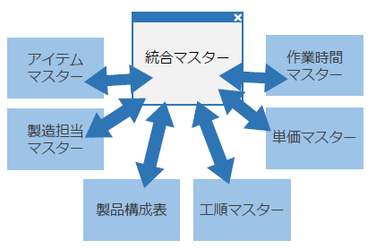
3.Centralized Management Using Integration Master【Update】
You can register new products and maintain existing products efficiently with centralized interfaces.
■ Improvement of workability and batch reflection
Master registration and update in a single screen 【5.0】:Information conventionally set across multiple screens, such as Work Center Master, Item Master, Bill of Materials, Unit Cost Master, Standard Working Hours, Detailed Process, and Inventory List, can now be registered and edited in a single screen only.
"Master Reflection" button 【5.0】:Based on the contents set in a single screen, all related master data can be automatically created and reflected in batch, improving work efficiency while maintaining consistency.
"Master Acquisition" function【5.0】:The system can read the structure information of existing products, adjust information in batch, such as changing suppliers, changing work processes, and adjusting amounts used, and then reflect them back to each master.
■ Maintenance accuracy and external linkage
Interlocked correction of common parts 【5.0】:If the same item is used in multiple places within a product, correcting the information in one place automatically corrects the item's settings in all other places as well. This prevents misreading and omission of corrections.
Excel-BOM linkage 【5.0】:The system supports input/output (import/export) of data as Excel files in a general BOM format that retains the hierarchical structure.
Master template function 【5.0】:By registering a standard product structure as a template, you can use it as a model for new registrations, reducing the man-hours required for data entry.
4.Issuing Instruction Data and Forms 【Update】
Based on the production schedules created through MRP calculations, Mfg. No. explosion, and project schedules, this function allows you to give accurate, rapid instructions to the site and place purchase orders to the outside.
■ Optimal instruction and plan management
Automatic selection of suppliers:This function automatically selects the least expensive supplier under the condition of the Unit Cost Master, allowing for giving by-ratio split instructions and automatic setting of standard and setup times.
Issuance of purchase orders and linkage with email transmission【5.1】:A function to send emails to suppliers at the same time as the issuance of purchase orders. TPiCS-X Ver 5.1 and later officially support "OAuth authentication," which is essential in modern cloud email environments, achieving secure automatic email transmission.
Flexible operation of schedule details linkage 【5.1】:Even when sales order data is deleted, issued work instructions and order data can be kept for make-to-stock production, allowing you to ship them for other sales orders.
Expansion of quotation-related work functions 【5.1】:To respond to raw-material price hikes, functions for issuing quotations and reflecting replies have been enhanced, such as batch quotation requests for expired items and individual quotation requests based on schedule details.
Preservation of production schedule table history【NEW】:Each time an MRP is calculated, the data of the Production Schedule table is preserved in a history table in a separate region. Because related sales orders, schedule details, withdrawal details, actual results, and inventory information are preserved together, you can compare past and current schedules, utilizing them for factor analysis and future AI learning.
DateTime type and shift management 【NEW】:The date type has been extended to the DateTime type, allowing you to manage schedules in units of hours, minutes, and seconds. Even in overnight shifts (e.g., until 2:00 the next day), the logical day break can be visualized and managed properly as today's job, substantially improving the accuracy of progress tracking.
■Form design and legal compliance
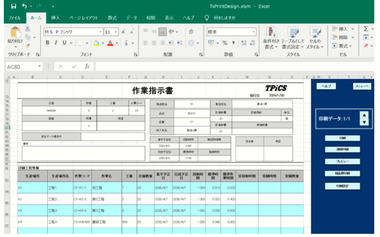
Form templates 【5.1】:Designs can be changed freely using Excel templates. Resource usage schedules can now be output as work instruction sheets, making on-site setups smoother.
Compliance with the Electronic Books Preservation Act 【5.1】:When a form is output as a PDF file, this function automatically generates the file name complying with naming conventions based on legal search requirements, saving and managing the form.
5.Actual Results Management 【Update】
This function monitors the site in real time, supporting precise cost and inventory control.
■ Various entry functions for actual results and tracing
Actual production result entry and automatic withdrawal【5.1】:Simply clicking the register button following instructions completes the recording of actual results and withdrawal of child parts, minimizing on-site effort. TPiCS-X Ver. 5.1 and later support the first-in, first-out withdrawal of child items when entering actual partial delivery results for Mfg. Nos.
Two-stage management (receipt and acceptance):Delivered items can be managed in two stages: "M: Receipt" to confirm receipt, and "K: acceptance" to confirm as payable, achieving accurate tracing of inventory pending inspection.
Utilization of actual unplanned results: The system features various classes to accurately digitize irregular site conditions, such as actual defect results (F), defect disposal (B), and recording only costs without inventory movement (G).
Manufacturing traceability and automatic lot naming 【5.1】:This function makes lot number entry upon receipt mandatory, achieving bi-directional tracing that carries information from materials to finished products. In addition, it automatically generates lot names from dates or order numbers, reducing the effort required for data entry.
6.Inventory Control and Counting 【Update】
This function allows for monitoring inventory accurately, reducing dead inventory while preventing stockout.
■ Receipt and payment management and advanced counting
Consistency check using in-and-out details:Fluctuation histories of all inventories can be tracked in chronological order. Statistical data, such as the last withdrawal date or goods receipt date, is also preserved, supporting early detection of stagnant inventory.
Non-stop counting:You do not need to stop the entry of actual results on the site even during aggregation. The difference between the ledger and counting result is reflected as "Inventory Difference" data, allowing the counting to be completed without stopping factory operations.
Enhanced cycle counting function 【NEW】:This new function allows you to preserve "Inventory Start Date" and "Inventory End Date" for each item. It systematically supports cycle counting, where the schedule is shifted for each shelf number or category.
7.原価管理 【Update】
■ 多角的な切り口による実務的な原価把握
TPiCSの原価管理は、単なる財務会計用の事後処理ではなく、計画に基づいた戦略的な予算管理と実績予測を目的としています 。日々の実績データを基に、用途に合わせた様々な切り口で原価を可視化できます。
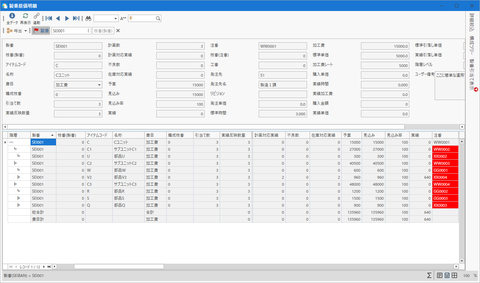
製品別原価集計:アイテムごとの標準原価と実際原価を対比し、構成階層を遡って差異要因を分析できます 。
部門別損益集計:次工程への供給を売上とみなす「部門売上」の考え方により、製造現場の能率向上や改善努力を利益として評価します 。
製番別原価集計:カスタム生産において、製造途中でも未完了分の予定原価を含めた最終的な着地予測をリアルタイムに把握できます 。(※f-MRP製番管理、製番管理システム機能)
ロット別原価集計:製造履歴(トレース)と連動し、特定の製造ロットに使用された原材料費や加工費を個別に集計します 。(※製造履歴管理オプション機能)
■ 実績データの整合性維持と再計算機能
現場の運用では、資材の受入登録の遅れや、完了日・時刻の入力順序の逆転により、移動平均単価などの計算にブレが生じることがあります 。TPiCSでは、月次締め等のタイミングで「実績単価の再計算」および「実績積上単価の再集計」を実行することで、蓄積された実績データを日付・時刻順に再処理し、正確な原価へと修復・解消させることが可能です 。これにより、業務のスピードを優先して日々入力した実績データから、精緻な管理会計データを後から得ることができます。
■ 出荷付帯費用の管理による包括的なコスト管理【New】【5.2】
Ver 5.2より、アイテムの管理区分に在庫管理を行わない「費用」を追加しました。これにより、製品原価とは別に発生する送料、梱包費、保険料、関税といった諸費用を受注や手配の明細として個別に登録し、管理できるようになりました。新たな実績区分である「買掛のみ」や「売掛のみ」と組み合わせることで、モノの在庫は動かさずに付帯費用の金額だけを正確に買掛明細や売掛明細へ反映させ、製品の直接費と連動したより厳密で包括的な収益管理を実現します。
8.File Export/Import Functions 【Update】
The core interface for linkage with other systems has been overhauled.
■ Various formats supported
More diverse output formats【NEW】:In addition to the conventional CSV, TSV, and XML formats, the system comes standard with export/import functions in Excel file (XLSX) and JSON formats.
Transaction and administrative document export/import functions 【Update】:The system features batch reading of schedules and actual results texts, as well as batch write-out of administrative documents of accounting data. The settings panel in TPiCS-X Ver 5.2 has been overhauled, improving operability.
Advanced settings and preview 【NEW】:The new SQL preview function allows output data to be checked and filtered before execution, increasing the reliability of file linkage.
XMLZ format for translation dictionary 【5.1】:The format of the dictionary file has been changed to the lightweight XMLZ, eliminating the need to install an Office engine.
9.Master Maintenance Function
This function streamlines complex master management and consistently maintains data accuracy.
■ Maintaining data consistency and batch maintenance
Batch conversion of identification codes and names:Items, work centers, Mfg. Nos., and other codes can be converted in batch. Part number revisions and other changes including past data can be reflected, while maintaining consistency.
Batch change of Mfg. No. names【5.0】:Mfg. No. names temporarily set for large items with a long manufacturing period can later be changed to formal Mfg. No. names in batch using screens or CSV, improving the control over design and manufacturing.
Changing multiple-location classes【5.1】:When a class is changed, this function corrects related data in batch while maintaining consistency. Retrospective maintenance by right-clicking is also supported.
Maintaining data integrity:In addition to real-time consistency checks during registration and updates, the system includes a post-processing consistency check function. This maintains data accuracy more robustly.
10.Conversion of Multiple Units and Quantities (converted values display function)
The system eliminates the barriers of management units varying by department and multiple currencies.
■ Advanced unit conversion and multiple currencies supported
By-item settings of converted values display【5.1】:In addition to general conversion, inventory conversion, and actual result conversion, the system can display converted values in list-type forms.
Unit cost and selling price master linkage【5.1】:You can register multiple quantities of content in different units from the base unit specific to each supplier and customer, which the system automatically converts to the optimal unit during entry.
Multiple currencies and aggregation supported:The system supports foreign currencies for sales and purchase orders, automatically converting them to the base currency at set exchange rates and aggregating them.
11.Calendars (operating, capability, and base calendars)
These calendars precisely reflect the actual operational status of business partners and your company's factories, ensuring the accuracy of catch-up calculations.
■ Flexible calendar operation
Setting individual operating calendars:You can individually reflect customers' business days, 24-hour operation, equipment maintenance days, and other information. Up to approximately 2.1 billion calendars can be created.
Base calendar function 【5.1】:This function automatically generates operating calendars for each bucket, such as day, week, month, year, or shift, supporting multi-level schedule development.
12.買掛・売掛および支払・請求管理
購買データから支払処理、売上データから請求処理までを一気通貫で管理します。
■ 買掛・支払管理
資材の検収実績から発注先ごとの「買掛明細」を自動集計します。支払条件に基づく「支払予定表」の作成から実績入力による消込管理まで一貫して行え、発注先と支払先が異なる取引関係にも対応可能です。また、電子帳簿保存法に対応した仕入明細書のPDF保存も備えています。
■ 売掛・請求・入金管理(※受注販売管理オプション)
出荷実績から「売掛明細」を自動集計し、得意先ごとの締日で請求データを作成します。インボイス制度対応の請求書発行やPDF保存が可能で、未入金額の消込や過入金額の次月引当など実務に必要な債権管理を行えます。
■ 会計システムとのスムーズな連携
買掛・売掛、支払・入金の確定データは、主要な会計ソフト(勘定奉行、PCA会計、弥生会計など)の仕訳フォーマットに合わせてテキストで書き出すことができます。現場の実績から直接仕訳データを作成できるため、二重入力を防ぎます。
13.User management and settings of functions/roles (authority management)
This function ensures safe system operations and internal controls (in compliance with J-SOX Law, etc.), achieving flexible access control that suits organizational hierarchy and assigned work.
■ Integrated management of users, groups, and roles
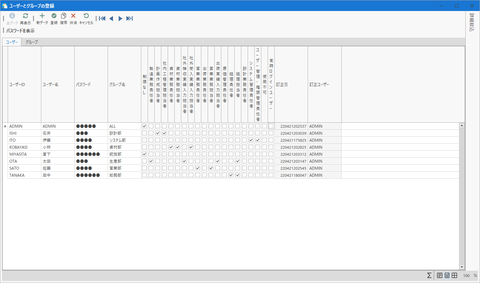
User and group management: You can register :TPiCS users to control their login individually. Assigning users to specific groups allows you to change the settings of the groups and achieve common operations of My Menu, reducing the effort required for management in the case of personnel transfer across departments, etc.
Role assignment:Multiple roles can be assigned to a single user (e.g., sales, manufacturing, administrative, temp staff) flexibly.
Settings of functions and roles (access authority):You can set authorities to screens and buttons, such as [Allow Operation/Editing (W)], [Display only/Read-only (R)], and [Hide/Prohibit Access (N)]. This achieves strict controls; for example, you can [Hide] screens that show costs and unit prices from those other than particular persons in charge or set [Display only/Read-only].
Internal control and correction history (log management):The Internal Control option automatically records the history of new data additions, corrections, and deletions in major tables within the system (Mfg. No. schedule, payment schedule, various masters, etc.) into a dedicated "Correction History Table." It exerts strong traceability in preventing data tampering and investigating the causes of problems.
Inheriting authentication:It is suitable for RemoteApp operations, etc., allowing for automatic login with inherited Windows authentication. This eliminates duplicate password management.
14.Production Schedule Pivot Table【5.1】
Massive amounts of accumulated data can be multi-dimensionally aggregated and analyzed in an Excel-like pivot table format, achieving swift business improvements and decision-making.
■ Flexible aggregation and visualization
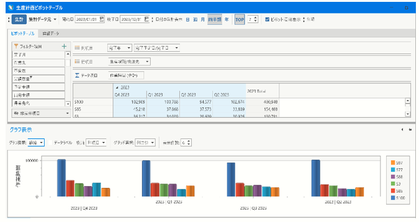
Multi-dimensional data analysis【5.1】:Aggregation tables can be intuitively created by dragging and dropping any items to lines, columns, and values. This function allows you to link any transaction data within TPiCS, such as schedule details, withdrawal details, actual results data, and sales order data. It supports analysis from various perspectives demanded on-site, such as "visualization of monthly load projections by work center," "revenue projections for the next six months calculated from forecast/sales order information," and "transitions in defect rates by item." It not only allows you to check aggregation results and drill them down on the screen as is but also makes it easy to maintain their status and output them to an Excel file for secondary modifications to be used as meeting materials.
15.Visualization and Analysis using Management Charts
TPiCS comes standard with various chart functions that strongly support problem identification and business improvements in production activities by analyzing daily accumulated actual results data from multi-dimensional perspectives.
■ Various management charts for problem solving
Progress management chart:The system can create charts that show the progress status against the schedule from three standpoints: Transition, Degree of Urgency, and Advancing. You can visually monitor whether the planned schedule is progressing smoothly, how much it is delayed, or whether schedule advancement to handle express orders is occurring frequently.
Yield management chart::The system calculates the ratio of actual result quantity to scheduled quantity (yield rate) by production location or person in charge of work, and displays them in ascending order. You can use the chart to identify processes that cause a decrease in yields. The results can be used as material for reviewing work procedures or considering equipment maintenance.
Cost reduction control chart:The system creates charts that show the transition of the ratio of the actual result unit price purchased to the standard unit cost by purchase order month. You can monitor the substantial costs, including the impact of exchange rate fluctuations in supplier countries, supporting strategic procurement activities such as review of supplier changes and the decision to switch to in-house part manufacturing.
16.Advanced Customization Functions (Form and Item Customization) 【Update】
The system can be extended to the optimal one for your company, with only settings and without program development.
■ Item customization and extension
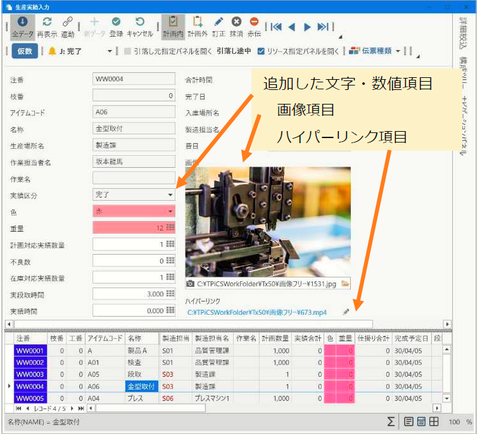
Addition of user fields【5.0】:Items specific to your company (e.g., colors, materials, drawing numbers, special notes) can be added and placed in each table as you like. TPiCS-X Ver. 5.0 and later support the display of hyperlinks and images, with Ver 5.2 supporting "Field Display Type" function to show QR codes. This allows users to read QR codes on the screen with tablets or handheld terminals. Using the carried-around field function, values entered in a master are automatically inherited to instruction data and actual result data.
Image display path settings 【Update】:TPiCS-X Ver 5.2 allows for the selection of an image display type from "Image Only," "Path Only," or "Image and Path." This makes drawing and product photo checks go more smoothly.
■ Form customization and UI-building
Customization of displayed items and layout 【5.1】:Captions, font sizes, background colors, drop-down lists, default values, tab orders, etc., can be specified. TPiCS-X Ver 5.1 allows each user to individually initialize (reset) a panel layout customized through trial and error. You can try changing layouts without worries.
User forms and My Menu【5.1】:Folders can be added to My Menu for hierarchical management; in addition, screen configurations can be tailored to your operations. Additionally, the system features a user form function to create original entry/display screens, which, when combined with an original SQL, allows you to build dedicated screens for directly referencing external DBs (such as sales management systems or MES) and displaying them within TPiCS.
17.Automation Processing (macros and scripts) 【Update】
This function automates daily routine tasks, drastically reducing man-hours and human errors.
■ Labor saving through batch processing and scripts
Standard processing in batch:Multiple processes performed every day in the same order, such as MRP calculations, Mfg. No. explosion, importing files, and issuing various forms, can be registered as "Standard Processing" and executed in batch with a single click or using night batches. This plays a core role in unmanned operation, such as letting the system run calculations after the person in charge has left the office, without human operators.
Macro recording function【5.0】:Simply clicking buttons on the screen records operation sequences as original script commands in text. Even staff without programming expertise can easily create and edit automation scripts simply by recording daily operations.
Pausing and resuming scripts【5.1】:This new function allows you to pause processing with a [Pause] command while a script is executed. It achieves flexible semi-automated operations where humans and systems collaborate. For example, the user manually checks error logs or corrects unit costs in the master during automatic processing, and then lets the system resume the remaining batch processing by clicking the button on the screen.
User-defined event processing settings【Update】:In addition to existing triggers, such as the completion of MRP calculations or schedule details creation, TPiCS-X Ver 5.1 and later allow you to call external EXE programs or batch files by daily operations, such as pressing the form printing button or outputting data, which achieves linkage with other systems.
Advanced script control 【Update】:TPiCS-X Ver 5.1 and later support operations on Gantt charts and structure trees while scripts are executed using dedicated commands. You can execute scripts by specifying input areas in dialogs and panels as well as tabs, achieving more precise, mistake-free automatic screen control. Additionally, an extended message function sends emails notifying administrators of errors in automatic import.