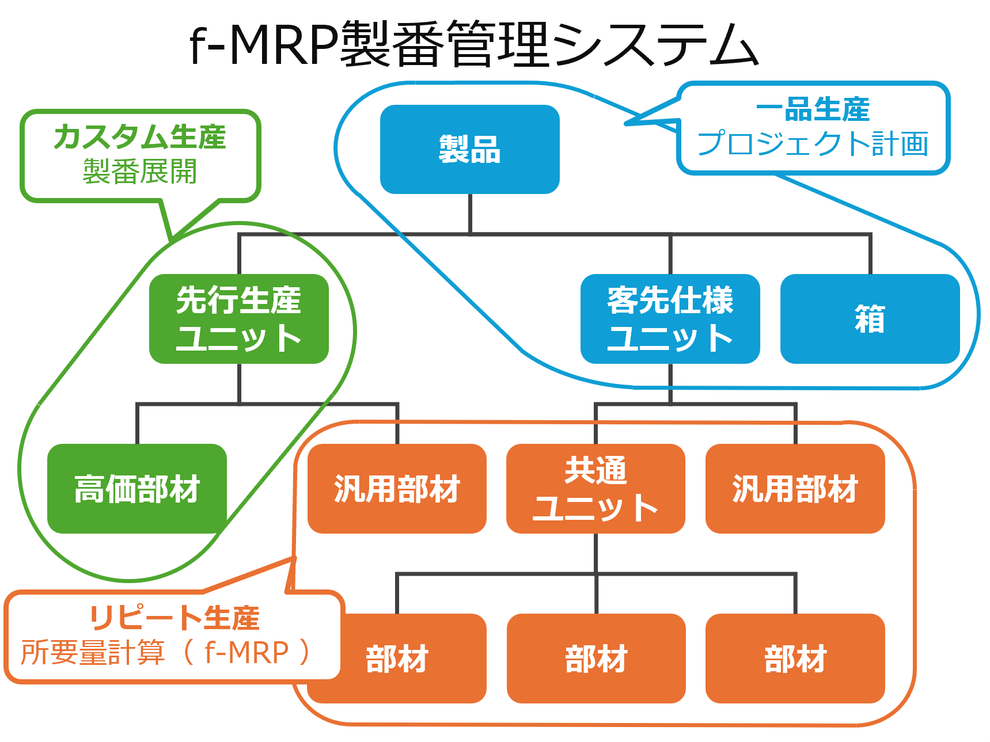
1-1.Production schedule creation function (f-MRP/MRP calculations) 【Update】
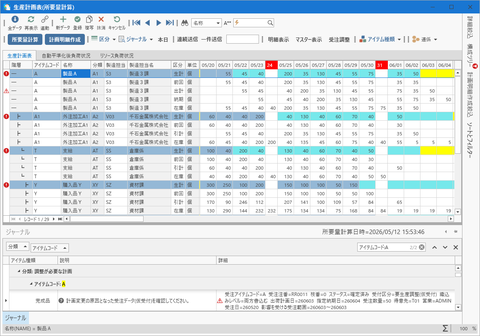
The core function of TPiCS-X, f-MRP (MRP calculations), is not just for exploding parts, but it is also fast, inexpensive, and responsive to demand fluctuations. At the same time, it is an innovative scheduling logic to realize stable production. Using anticipated schedules based on sales order data, forecasts, or sales projections directly entered into the Anticipation line in the Production Schedule table, the system automatically develops an arrangement schedule, according to Bill of Material (BOM) that is consistent from products to intermediate units and the end materials and parts. It frees you from the operation of ad hoc adjustment of monthly schedules with Excel and the like. Based on the latest sales order status and actual inventory, the system recalculates the future optimal schedules, allowing you to maintain live, feasible production schedules at all times and respond to changes quickly.
■ Parameters for flexible production schedule development
With parameters that can be set for each item, the system creates a detailed schedule that matches the actual operation of the site.
・Function of lead time and allowance (buffer)
Manufacturing lead-time:Sets the number of days required to complete an item from start to finish and back-calculates the scheduled start date from the scheduled completion date.
Unit manufacturing lead-time (standard time):Sets the production time per item. By setting it together with the setup time, load is accurately calculated, allowing for developing a schedule according to the manufacturing quantity.
Allowance for manufacturing lead-time:In case that the required time is slightly advanced after the schedule is fixed, the parameters of the Item Master can be adjusted to avoid unreasonable express instructions to the site and maintain stable production.
Delivery lead-time:Manages the holding period after an item is are delivered or completed until they are used in the next process or shipped, as well as transportation periods.
Allowance for delivery lead-time:You can set the minimum buffer necessary to meet customer requirements and avoid causing confusion to suppliers, in the case that parts are not available on time.
・Lot-sizing functions (units of purchase order and manufacturing)
This function automatically calculates the optimal units of purchase order and manufacturing according to the actual business situation.
Basic lot-sizing:Specifies the minimum unit of manufacturing and purchase order, and rounds it up automatically.
Two-stage lot-sizing:Secures the minimum quantity with the first lot size and rounds it up by applying the second lot size (increment unit) to the extra quantity beyond it. For example, you can make a realistic arrangement by limiting the maximum quantity while totaling the required quantities over a certain period of time.
Lot-sizing within a period:Totals the required quantities within a specified period (e.g., days, weeks, months) to optimize the number of setups and purchase order placement.
Maximum lot-sizing:Sets a maximum value of manufacturing and purchase order for each lot-sizing. If the specified quantity is exceeded, the slip is automatically split to accommodate the capacity of the equipment and distribution restrictions.
Calendar accumulation:This function allows you to schedule an arrangement on a specific day of the week according to the delivery destination or your company's date of reception.
■ Correction based on defect rate (item and bill of materials)
Assuming a certain yield in the manufacturing process, this function automatically develops a schedule for arranging and producing an extra quantity in advance. In addition to setting the defect rate for the entire item, you can individually specify the defect rate of a particular child item for a particular parent item based on the Bill of Materials to calculate a more realistic net withdrawal scheduled quantity.
■ Various buckets and dynamic schedule operations
・Operations with up to 365 buckets
The number of scheduled days (buckets) in the Production Schedule table can be defined in units of day, week, month, and even shift, up to 365 buckets. By using calendars with different units in a single schedule, you can respond to longer material delivery times and give the latest detailed instructions to the site.
・Management of multi-level structures with up to 128 levels
You can build a multi-level hierarchical structure of up to 128 levels for a product, achieving the simulation and arrangement of even complex products in batch.
■ Monitoring calculated inventory that reflects the actual situation
・Developing schedules based on calculated inventory
Starting from the current inventory, the system develops a schedule based on a calculated inventory that accurately reflects purchase orders already made and delays in delivery and work. By simulating inventory transitions over time at all hierarchical levels, and replenishing only the necessary quantity exactly upon a shortage, it can both reduce inventory and prevent stockout.
Base stock (Buffer inventory):A buffer to respond to sudden demand fluctuations and shortened delivery times within the period for which the schedule details have already been created. Even for parts with long procurement lead time, setting the base stock achieves stable production while avoiding making unreasonable express requests to suppliers.
Minimum inventory:When a minimum inventory is set, a replenishment schedule is created to ensure that the inventory does not fall below it, reducing the risk of stockout.
Maximum inventory:It is the upper limit of inventory for avoiding excess inventory during auto-replenishment, ensuring an appropriate inventory level.
■ Load aggregation and visualization 【5.0】
・Showing load distribution over a production period
After MRP calculations are performed, the load of each department and equipment is automatically aggregated based on the standard setup time of the item. In addition to the conventional method that piles up only on the scheduled completion date, TPiCS-X Ver. 5.0 and later are implemented with a function to distribute the load over the entire manufacturing lead time for aggregation. This prevents unreasonable schedule interruptions, allowing you to monitor the realistic status of the load.
■ Stable operation and change management of schedules
・Protecting instructed periods
Schedule details creation period:Even before an instruction is given, setting a schedule details creation period allows for fixing a schedule as if instructed. A change slip is issued for changes to the period to which an instruction has already been given, so careful adjustments can be made, taking into account the situation of the site and the supply sources.
Order issue period:An order issue period can be specified individually for each item, ensuring operation with a stable schedule over the appropriate period for each item. Purchase order lead times can be controlled according to the supplier and production department for each item. If it is expected that the product shipment or delivery time will not be made in time, instructions can be issued to handle it an express item to respond to it.
・Fixing schedules
Fixing schedules manually:You can explicitly fix a specific schedule by using the [Shift] and arrow keys on the Production Schedule table, even if the schedule is for that after a period for which schedule details have been created.
Fixed level:Fixed levels can be used to hierarchically fix schedules for processes where you want stricter control over schedule variations. Even if a shortage occurs within the fixed period, the system will not automatically make additional arrangements; instead, the values in the Inventory line will be negative, and the journal will warn you. It achieves a reliable operation that allows human operators to manually adjust production schedules, but because it requires more time and effort, focusing on the bottleneck process is more effective.
1-2.Journal function (f-MRP)【Update】
TPICS-X achieves data-driven management that identifies what to do now, without the need for detailed checks by human operators.
■ Journal function to prevent future problems
・Visualizing delays in and shortages of lead time
This function displays in a journal the schedule changes that require attention by human operators, such as exceeding purchase order lead times due to sales order changes or defects in intermediate processes. It clarifies when, what, how many shortages, and which shipments will be affected.
・Improved visibility of new Journals and jump to production schedule tables [5.1]
By simply clicking on a journal, you can instantly jump to the corresponding Production Schedule line and make adjustments. Besides, each record in the journal displays a warning icon, allowing you to identify the priority and urgency of the journal at a glance.
・Showing hints for detailed solutions 【5.1】
Instead of just displaying the error, a guide to action-taking (a hint button) is shown.
■ System optimization
・Separating journals and operation log tables【New】
Journals, which show the result of calculations, and tables, which record the operation history, are separated. This ensures a stable response even during large-scale operations.
1-3.Linkage with sales orders
■ Consistent workflow from sales order to production
・Automatic schedule calculation based on delivery dates
When a designated delivery date of sales order data is registered, it is automatically reflected in the shipping schedule and delivery date lines. The production planned date is automatically calculated based on the Bill of Materials and lead time starting from the shipping date.
・Automatic calculation of required quantities linked to inventory status
Calculated inventory is verified in real time, and if there is a shortage in the inventory, a production schedule is automatically developed with no excess or shortage through MRP calculations (f-MRP).
■ Flexible made-to-order production based on sales orders by linking with schedule details
・Creating production schedules (schedule details) linked to sales orders
At the same time as sales order registration, a production schedule dedicated to the order can be created, allowing you to give manufacturing instructions and manage progress consistently, linked to a specific sales order.
・Responding to individual specifications using withdrawal details
Required units and parts can be individually added from manually entered withdrawal detail data, allowing you to flexibly respond to individual specifications.
・Automatic explosion to child items and arrangement
The added units and parts are recognized as component child items in the following MRP calculations, and an arrangement schedule is automatically created according to the start date.
■ Synchronizing and adjusting sales orders and production
・Production adjustment required (sales order adjustment) function【5.1】
When an express schedule occurs due to a sudden sales order and other reasons, the reception class of the sales order data is automatically changed to Production Adjustment Required (provisional reception) to support the decision-making of delivery date adjustment.
1-4.Running change function
■ Automating and optimizing part switchover
・Automatic switchover considering inventory and open order
When an item is registered in the Switchover Master, the system automatically calculates when inventory will be depleted, automatically switching to purchase orders for new parts at the optimal timing.
・Flexible response to fluctuations
Even in the event of a change to the production schedule or a change in inventory quantity, each time the MRP is calculated, the system responds to it in real time, eliminating the need for manual adjustments
・Link to actual result entry and automatic withdrawal
When the actual result of a parent item is entered, the system automatically switches the automatic withdrawal of its child part between old and new parts according to the switchover timing, preventing inventory inconsistency.
2-1.Production schedule creation function (Mfg. No. explosion)
The system assigns a unique Mfg. No. number to each sales order, linking items from the product to the end part, allowing for thorough identification of the progress. This enables precise control over costs and delivery dates for custom production, where specifications vary by customer.
■ Three Mfg. No. control methods of firmly linking orders and production
B-Seiban (Basic Mfg. No.):All hierarchy levels can be connected using Mfg. Nos., and the structure can be tailored to each schedule. It is ideal for individual made-to-order production, which covers steps from design to manufacturing.
S-Seiban (preceding arrangement Mfg. No.):Intermediate units are arranged using preceding Mfg. Nos., and confirmed Mfg. Nos. are allocated to them. Before a sales order is received, if forecast or sales order placement is highly promising, arrangements can be made for parts and unit production in advance.
F-Seiban (f-MRP Mfg. No.): This control method uses Mfg. No. to link schedules developed through f-MRP. Mfg. Nos. can be allocated to schedules created in base stock or lot-sizing.
■ Enhanced Mfg. No. explosion functions and flexible operations 【Update】
・Compensating for shortage in S-Seiban at the time of B-Seiban explosion 【5.1】
During B-Seiban explosion, if S-Seiban to allocate is short, schedule details for B-Seiban can be created to compensate for the shortage. This eliminates the need for creating a new S-Seiban to compensate for the shortage and then returning to B-Seiban to explode it again, which improves the work efficiency.
・Enhanced linkage between MRP calculations and F-Seiban
Mfg. No. can be exploded in MRP calculations, and it is now possible to give a Mfg. No. name in F-Seiban explosion following MRP calculations. Besides, for F-Seiban, Mfg. No. allocation to schedule details can be canceled in MRP calculations, and then allocate it again. This allows for accurate allocations without changing the order of Mfg. Nos., even if the schedule is advanced as a result of MRP calculations.
・Creating B-Seiban schedules based on production schedule table
Production Schedule table displays B-Seiban in a Mfg. No. line, allowing for creating a Mfg. No. schedule simply by entering quantities in the Mfg. No. line. An anticipated Mfg. No. schedule can be registered; in addition, Mfg. No. can be exploded at the same time as MRP calculations, allowing for seamless development of a schedule for generic parts.
・Optimizing the timing of issuing slips
Based on the order issue period (purchase order lead time) set for each item, the scheduled order issue date is automatically set in Mfg. No. explosion. This ensures that a slip is issued when arrangement is actually necessary.
・Supporting multi-level structures
The system supports multi-level structures up to 128 levels. It creates arrangement instructions for all hierarchy levels in a single explosion, managing them consistently with Mfg. Nos.
2-2.Journal function (Mfg. No.) 【Update】
The functions for early detection of unreasonable schedules in individual made-to-order production have been greatly enhanced.
■ Mfg. No. journal function 【New】
・Detecting abnormalities of Mfg. No. control items
This function warns of delay beyond delivery lead-times, manufacturing lead-times, and order issue periods (purchase order lead-times), as well as shortages of Mfg. No. to allocate found during Mfg. No. explosion. In addition, when checking Mfg. No. in Mfg. No. schedules and Mfg. No. Gantt charts, the system checks the entire Mfg. Nos., showing items that need addressing in a journal. This helps prevent delays beyond delivery dates early.
・Jump function for quick adjustment
By simply clicking on the journal, you can instantly jump to the corresponding schedule on the Mfg. No. Gantt chart, allowing for smooth delivery date adjustment.
■ Automatic reply of sales order reception class【New】
Based on the presence or absence of a Mfg. No. journal, the system automatically determines the reception class of sales order data so that on-site load status can be immediately shared with sales representatives.
2-3.Gantt chart display by Mfg. No. 【Update】
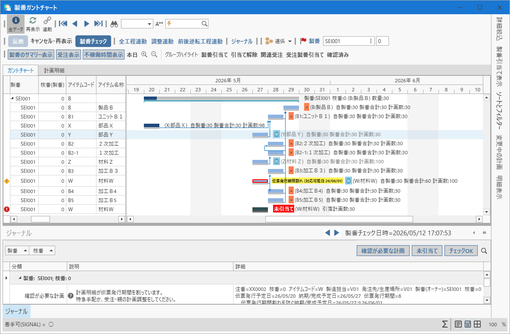
This function allows you to centrally manage and visually check the progress of processes linked to each Mfg. No. Detailed processes can also be displayed on a Gantt chart, allowing for the more precise identification of the progress.
■ Intuitive operation and visualization
・ Synchronization adjustment and tracing function by drag-and-drop 【New】
When the delivery date is changed, operations on the Gantt chart updates the schedule of the linked pre-and post-processes in conjunction with it, achieving speedy schedule adjustment. It involves a function to link all processes and to link them so that they are not moved and reversed. In addition, when a schedule is moved by dragging, a gray trace shows the original schedule position until it is reflected in the schedule details, exactly showing the change history.
・Visualizing schedule reversals 【New】
This is a new function to show reversals of sales orders and Mfg. No. schedules, as well as those of the completion and the start of schedule details.
・Journal marks and color-coded warnings in Gantt charts 【New】
A warning mark is displayed on a chart for schedules with a warning, allowing for immediate identification of bottlenecks. The new system displays journal warnings in yellow. In addition, allocation shortages, which occur when arranged materials become short due to defects in actual production results, are displayed in red, making the severity of the problem clear at a glance.
・Function to hide and unhide confirmed warning 【New】
Even if a manufacturing lead-time or order issue period is exceeded, when production is confirmed to be available, the warning can be temporarily hidden as "Confirmed." Subsequently, if the production schedule changes, the system unhides the warning, allowing you to quickly and reliably identify arrangement that require attention.
・Function to cancel and perform allocation 【New】
You can cancel the allocation of a Mfg. No. on a Gantt chart and allocate another allocatable schedule. In addition, a Mfg. No. can be allocated to sales order data to which Mfg. No. schedule has not yet been allocated.
2-4.Structure change function 【Update】
This function helps you flexibly respond to environments with frequent design changes.
■ Flexible structure editing
・Intuitive editing
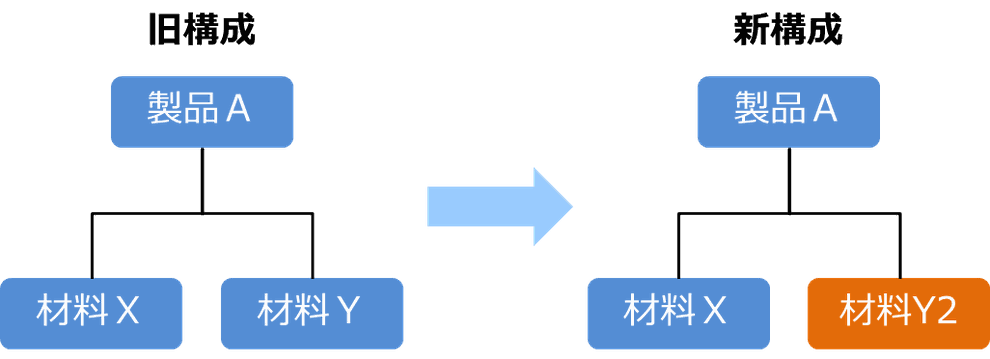
By operating a Mfg. No. structure tree, you can easily make changes to individual specifications of each sales order.
・Specification selection by option code
By simply specifying specifications at the time of sales order, the system automatically makes arrangement to substitute specific parts for those in the standard specifications.
・Item removal function 【New】
You can remove an arranged item from a Mfg. No. and replace it with another item. This achieves rapid response to design changes and part diversions in the course of production.
2-5.Function to aggregate costs by Mfg. No.
This function visualizes the profitability of each order in real time.
■ Precise plan-to-actual management
・Real-time comparison between a plan and actual result
Even in the course of manufacturing, costs of incomplete items are calculated as planned costs, allowing you to project the final outcome early.
・Incorporating costs of f-MRP items
Costs for common parts can also be accurately aggregated by including them in the cost details for each Mfg. No.
・Distributing actual result amount to lots allocated to multiple Mfg. Nos. 【New】
If the same lot is allocated to multiple Mfg. Nos. and partially delivered, the actual result amount of that lot can be distributed in the order of issue planned dates to aggregate costs for each Mfg. No.
3.Supporting various sales order types using by-item management methods
The greatest feature of TPiCS-X is the ability to flexibly select from f-MRP- and Mfg. No.-based control and mix them.
■ Selection of the optimal production control method
・Make-to-stock production and repetitive production
f-MRP, which allows for flexible responses to demand fluctuations, is ideal. The system efficiently arranges common materials at low cost based on projection.
・High-mix, low-volume made-to-order production
If you want to control progress and part arrangement of a product for each sales order separately, apply Mfg. No. control to the product.
・One-item production
In environments requiring design for each sales order, use the One-item Production option to achieve flexible arrangement and production without the need for master registration.
■ Overall optimization through hybrid operation
Through hybrid operation, such as linking final products to each customer based on Mfg. No. for management purposes, while collectively and efficiently arranging lower-level common parts and general-purpose units based on f-MRP, you can achieve both flexibility and efficiency, realizing the true aggressive production control.
TPiCS-X Ver 5.2 provides powerful backup for aggressive manufacturing that is high-quality, inexpensive, and responsive.