options
The TPiCS-X options, designed based on the f-MRP and Mfg. No. control systems, are extensions that respond to specific business areas and meet fragmented management needs. These options do not need to be implemented all at once at the time of system implementation: options can be added as needed as the level of your operations improves or when management-related items are added. They improve management accuracy while keeping up with the changes in the production types of your company, while maintaining operations in line with the actual situation.
< Options to enhance the schedule development capability >
< Options to enhance sales order management >
< Options to enhance production control >
< Options to enhance system operations >
< Options to enhance the schedule development capability >
Gantt Chart By Mfg. Sector Option
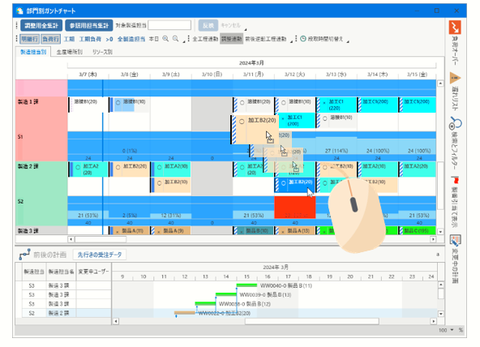
This option visualizes production schedules for each item created in TPiCS from the viewpoint of the production location, such as the person in charge of manufacturing, equipment, and production lines, allowing you to check and adjust the load. This tool is intended for changing and splitting schedules at the discretion of the site while obtaining the results of automatic calculation by f-MRP.
■ Visualizing load and identifying bottlenecks
The system compares the capability of each production resource (capability registered to the Work Center Master) and the scheduled load quantity (scheduled quantity x standard time + setup time) on a daily basis and shows the result. If the set maximum load factor is exceeded for a particular day, the graph shows a warning color for the day so that you can identify operations with insufficient capability. You can implement measures based on numerical evidence, such as considering overtime and holiday work, as well as transferring scheduled work to other available equipment and outsourcing partners.
■ Intuitive operations by drag and drop
You can drag and drop schedule boxes on a chart to change the scheduled start date, scheduled completion date, and responsible location. Moreover, all related processes can be grouped and moved together. Two modes are available: all aggregate for adjustment and aggregation of person in charge for reference. The system allows for display with the aggregation speed prioritized according to the use.
■ Flexible schedule adjustment【5.1】
Schedule splitting and totaling functions have been enhanced. You can split a schedule by any quantity or number of records to finely adjust the load, or combine fragmented schedules into one, achieving an efficient production arrangement with less setups. Even if some portions of actual results have already been recorded, a schedule can be divided within the remaining quantity, allowing for flexible responses to sudden troubles or changes in priority. In addition, the system supports the "Set as temporary" function, which executes all of these adjustments in memory. The actual data is not updated until the "Reflect" button is clicked after repeated trial and error on the screen, so it can be used for a simulation to derive the optimal schedule.
■ Simultaneous editing by multiple users【5.1】
The " Synchronization table method" is employed, assuming multiple persons in charge of schedules use the system. The system has shifted from the conventional method of locking the entire system to a line-by-line lock method for each schedule detail. This enables multiple persons in charge to open Gantt charts simultaneously, allowing them to reflect data in their own scopes of responsibility independently. This eliminates the waiting time for data updates in schedule adjustment work.
■ Integration with resource and maintenance management 【Update】
The usage schedule and wear projection of resources such as molds, jigs, machines, and equipment are displayed as a Yamazumi (stacked bar) chart using a dedicated tab in the Gantt chart. By placing a maintenance schedule box before the threshold is reached and simulating that the consumption amount is reset when the work is completed, the system helps develop production schedules based on preventive maintenance.
One-item Production Option
This option provides functions specialized for individual made-to-order production, where specifications vary by sales order, with design, procurement, and manufacturing proceeding in parallel (phased arrangement). They streamline the structure management of projects with many uncertain factors and reduce procurement lead time.
■ Masterless start-up
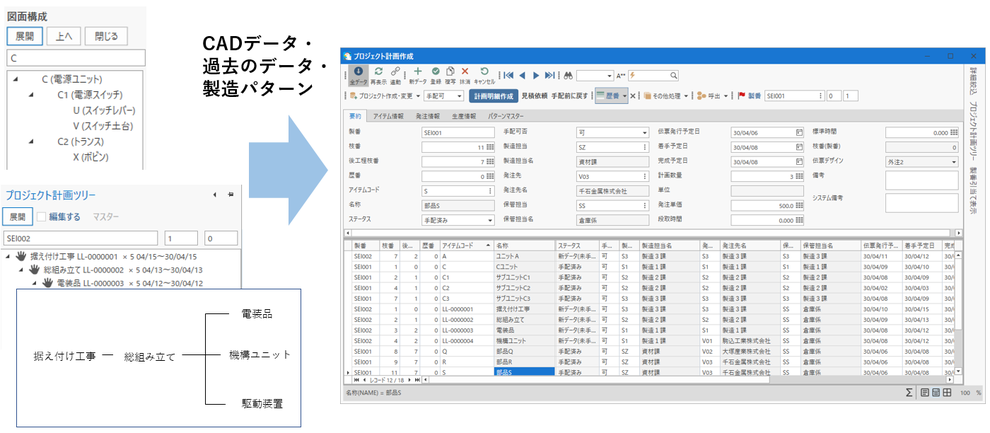
You can enter unit structures and part information directly on the project screen to start arrangement without the need to register the Item Master or bill of materials beforehand. This responds to the operation of vertical start-up, where parts are arranged sequentially upon completion of their drawings.
・Creation from templates:By registering previous standard structures or units as "fixed pattern masters," you can complete the structure data simply by calling them and deleting unnecessary parts or adding new parts.
・Creation from CAD data:Linked with the Structure Information Conversion option, the system can directly import a bill of materials (CSV file) created by the design department as a project structure. This prevents errors that may be caused by manual copying.
・Copying similar projects:You can specify a previously created project and copy its structure tree to start up a new project.
■ Flexible tree-based structure editing
You can add, delete, and move (drag and drop) items on a tree-based graphical representation of the hierarchical structure. It allows for managing a mix of unregistered new parts and general-purpose parts registered in the master. Using the Add Child Item and Master Search panels, you can allocate parts to a specified structure hierarchy.
■ Quotation calculation and competitive quotation supported【5.1】
Project structures can be used for quoting the cost of the entire product. You can output the quotation request data of new parts to suppliers and directly reflect the replied unit price in the project schedule data while managing the status (e.g., in preparation, requested, received, adopted). The process of obtaining competitive quotations from multiple suppliers and adopting the optimal unit costs is completed within the system.
■ Flexible structure adjustment after actual results registration【5.0】
Even if actual results of material issues and completed work have already been registered, the structure can be modified according to the latest design changes, and the rest of production control can be continued without the need to cancel past actual results. This responds to operations such as outside-of-structure withdrawal and additional goods issues.
■ Enhanced remainder allocation function【Update】
On the screen, you can search for schedule details data that is no longer needed (orphaned) due to design changes and allocate it to part requests for other ongoing projects. TPiCS-X Ver 5.2 allows you to arrange additional new items based on customer's individual specifications during remainder allocation, achieving both effective use of surplus assets and response to specification changes.
Structure Information Conversion Option
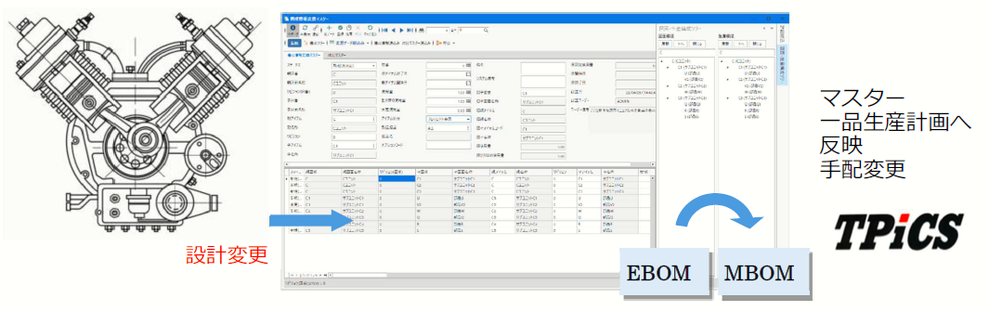
This function automatically links the bill of materials output from the CAD system of the design department and E-BOM (CSV format) created in Excel to the master data (M-BOM) of the production control system.
■ Response to large-scale projects
In projects where the design progresses in a phased manner, you can import exact design data of completed units. This eliminates the effort required for data entry and prevents misarrangement and other troubles.
■ Conversion using contrast master
With the Contrast Master used for managing the link between drawing numbers used on drawings and item codes managed by the production control side, the system automatically converts data in a different code system to item codes for production control and imports them.
■ Automatic generation of M-BOM from E-BOM
Based on the setting of the Conversion Master, the system adds sub-materials (packaging materials, grease, paint, etc.) that do not appear in drawings, outsourced processes, and free supplies, converting design information into data that can directly be used for manufacturing and arrangement. The depth and sorting order of the structure hierarchy are also rebuilt in the system according to the order of the manufacturing process.
■ Tracing design changes
This function compares modified design data with imported data, automatically detecting differences. Status management (such as new, reflected, changed, and deleted) automates instructions to cancel unnecessary parts as well as to give instructions for manufacturing or creating a purchase order of newly added parts, resolving data inconsistencies between design and manufacturing. Option codes can also be used to add or change optional parts exclusively in a particular Mfg. No. structure.
Multiple Locations Option
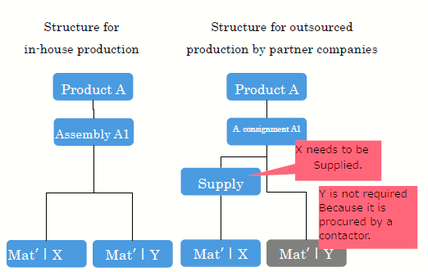
This function allows for independently developing a production schedule and managing an inventory for each location, such as multiple manufacturing sites, warehouses, or partner companies (outsourcing partners), even if the item codes are the same.
■ Setting of multiple location class
"Multiple-location Class" in the Item Basic Master can be set to Single, Multiple, Production Schedule Split, Withdrawal Schedule Split, By post-Process, or Supply according to the purpose, allowing for controlling the calculation logic for each site.
■ Schedule development according to the capabilities of each site
Different manufacturing lead-times, lot sizes, and operating calendars can be set for each site, and production schedules can be created according to the actual situation of each site.
■ Flexible schedule transfer and load distribution
When the load is high at the site in the original schedule, you can manually transfer the schedule to other factories or outsourcing partners. In addition, "Production Schedule Split" and "Withdrawal Schedule Split" automatically split production schedules (production schedule split and withdrawal schedule split) by a specified ratio or upper limit according to the registration details of the Split Schedule Master, distributing load and risks.
■ Strict supply management and control by post-process
The system handles the inventory of each site separately, preventing the mistake of allocating materials intended for a specific site to the wrong site. This function strictly separates inventory linked to sites by f-MRP calculations and demand. In supply management, the difference between paid and free supplies can be set. The system develops a detailed material supply schedule according to the start date of the next process through MRP calculations, considering the number of days required for transportation between sites.
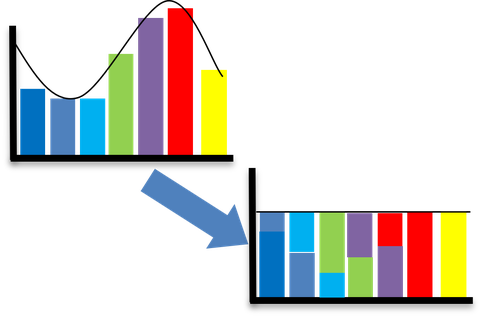
Automatic Leveling Option
The system automatically adjusts (level) the production load calculated by f-MRP so that it does not exceed the capability of each line or equipment, and allocates it to feasible schedules.
■ Settings of load factor subject to leveling and allocation priority
You can set a "Load Factor Subject To Leveling" to the Work Center Master for calculations with a specified upper limit of load factor, such as 100% or 110%. Besides, by specifying an "allocation priority for leveling" in the Item Master, etc., you can prioritize particular, important items in the schedule.
■ Automatic schedule shifting
This function compares daily production capability and load, automatically moving exceeded load to available schedules. You can select either front-loading, which prioritizes delivery dates by moving the start date earlier, or back-loading, which reduces inventory stagnation by moving it closer to the completion date, achieving optimal adjustments for each item.
■ Consideration of manufacturing lead-time【5.0】
instead of determining the load from a single completion date only, the load is aggregated on a prorated basis over the entire lead time from start to completion. This prevents an unreasonable schedule from interrupting a time-consuming process, improving the accuracy of leveling calculations.
■ Equally-allocated (Ratio-based) production
This function automatically creates a daily detailed production schedule by evenly distributing weekly total production quantities based on the ratio specified for the working days. This helps stabilize takt time and level the load on the production site.
Set Production Option
This option is used for managing, in a synchronized manner, the left and right pairs of parts (e.g., left and right door knobs, car headlights), items that are produced from the same mold for the same number of parts simultaneously, or co-products that are generated at a certain ratio during production (press scraps, electronic components of different grades, etc.).
■ Di-directional production linkage
Based on the production characteristics of the equipment, the system comprehensively checks inventory status within a group. The system automatically replenishes any missing items at a preset ratio to prevent a shortage in the set schedule. This optimizes the inventory balance of the entire group while leveraging the benefits of production from the same mold for the same number of parts and co-production.
■ Batch adjustment and management【5.1】
When a schedule is moved on the Gantt chart, the schedules for all related set products automatically follow it. Additionally, the system automatically assigns a common order number (with different branch numbers) to set products, allowing for issuing a single work instruction for multiple items or registering actual production results in batch. This reduces the man-hours for slip management and data entry at the site.
■ Wide scope of application due to synchronized production
This option is applicable not only to material processing and intermediate units but also to final products.

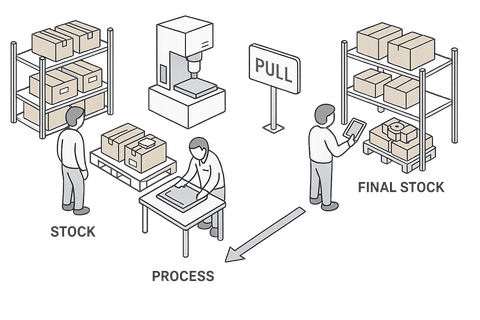
Pull Production Option
This operational function reduces work-in-process inventory by combining advanced material arrangement using f-MRP calculation logic with "pulled by post-process (electronic Kanban system)" synchronized with the on-site progress.
■ Separation of advanced arrangement and replenishment instructions
For long-lead items or materials purchased from outside, the future required quantity is projected by f-MRP calculations, and advanced arrangement is performed based on the difference between the schedule detail creation period and order issue period, preventing stockout. On the other hand, start instructions for internal processes do not unconditionally follow the planned schedule calculated by the system; instead, the "inventory (consumption) actually pulled" from the preceding process from the post-process triggers a real-time insurance of manufacturing instructions as "pull production requests" to replenish the exact quantity consumed.
■ Suppression of work-in-process inventory and message function
This function controls the behaviors of push-type production, where preceding processes produce too many products at unnecessary timings based on calculated schedules. This achieves just-in-time production. From the Shop Floor Control option screen, requests for replenishment from post-processes to preceding processes can be made directly. Moreover, texts indicating priority or designations of express order can be entered as "messages," supporting coordination between sites.
< Options to enhance sales order management >
Customer Order & Sales Management Option 【Update】
This option is used for centrally managing a series of sales processes, from importing sales orders and forecast information to giving shipping instructions, billing, generating data for accounts receivable details, and processing cash receipts together with the data on the production control side.
■ Direct link to production and arrangement schedules
When sales order data is registered, it is written to the shipping schedule (shipping schedule line) in the Production Schedule table and acts as an independent demand for f-MRP. Performing the subsequent MRP calculations consistently explodes the arrangement schedule of parts and materials at the end of the configuration.
■ Reconciliation management of forecasts and firm sales orders
While importing long-term forecasts in advance and proceeding with arrangement, the system automatically offsets (reconciles) old forecast quantities when firm sales order data is registered. By adjusting the "reflection level" of forecast data, you can control the risk of arranging items for uncertain demand (unnecessary parts stockpiling).
■ Actual shipping results and sales recording
In addition to the function to automatically record sales at the same time as actual results registration, you can select a method to keep actual shipping results in the status of "Temporary Shipping (uninspected at customer's site and in transit)" and officially recordsales when you enter "Acceptance" at a later date.
■ Accounts receivable details and billing management
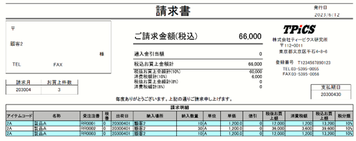
The system creates accounts receivable details for each customer from the sales data. It issues invoices according to the closing date and performs reconciliation upon cash receipt consistently. Multiple designs of forms, including invoices, are available, and you can issue invoices with multiple tax rates.
■ Product issue instructions
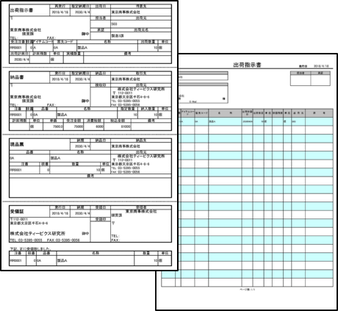
Using this function in conjunction with the Issue Management option automates instructions to pick items from product warehouses to shipping locations. When this function is used in conjunction with the Manufacturing Traceability option, you can specify in the system the lot to be allocated for shipment beforehand.
■ Management of sales order trends 【5.0】
The system records the change history of how forecast order quantities and sales order delivery dates have changed since they were registered. The data can be used for analyzing customer order characteristics and demand fluctuation.
■ Enhanced unit conversion and selling price management capabilities 【5.1】
You can register unit prices in multiple sales units, such as cases, boxes, or pieces. The system automatically converts the quantity of the sales unit specified at the time of sales order entry into the base unit, reflects it in the production schedule, and performs calculations.
■ Management of shipping-related costs 【New】
TPiCS Ver5.2 allows for registering shipping-related costs, such as transporting costs, packaging costs, and insurance premiums, as sales order details and linking them with sales data. The related costs having the same transportation number are automatically recorded in batch when actual results are registered.
Delivery Date Reply Option
When an inquiry is made from a customer regarding delivery dates, this function simulates when delivery will become possible by calculating the current product inventory, the status of work-in-process on the production line, and the procurement lead time (order issue period) of parts and materials at the end of the structure.
■ Accurate delivery date simulation calculations
Based on the desired delivery dates and quantities, the system identifies shortages across the hierarchy, from product to material at the end of the structure. In the case of a parts shortage, it develops an arrangement schedule while observing the purchase order lead-time (order issue period) set for the item, adds the manufacturing lead-time for each process based on the goods receipt availability date, and back-calculates the final product-completion date. This allows you to provide the soonest possible delivery date. You can change the simulation conditions by selecting from "after the confirmed period," "after the confirmed period for outside the company only (interruption is allowed inside the company)," or "express (interruption is allowed both inside and outside the company)."
■ "Ship Today" at the time of inventory allocation supported 【5.0】
In the calculation for replying delivery dates, when the product inventory is allocated, this function automatically sets the replied shipping date to today (calculation date). It acts as an instant delivery reply logic for stock items.
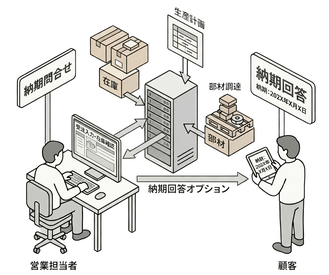
■ Automatic calculation of flexible partial delivery proposals
After performing calculations, the system presents a practical partial delivery schedule by using multiple split logic according to the purpose, such as "Inventory Allocation by Splitting," which first replies only the items in stock; "In-house Split", which calculates the schedule for each produced lot size; and "Split All," which presents detailed schedules for every supply timing.
■ Direct linkage with schedules and sales orders
Simply clicking buttons directly creates "Sales Order data" and "Schedule Details data" for arrangement from simulation-calculated delivery dates for reply. Inheriting the calculation results as actual results data reduces the time and effort required for entering them again, shortening the sales order lead time.
Quote Management Option
This function is used for submitting quotations for one-item production and calculating quoted costs using past actual production results data. It helps secure profits based on accurate cost calculation.
■ Saving and reusing quotation history【5.1】
When a quotation (hard copy, PDF, etc.) is issued, the data is stored in two history tables: Product quotation History table and Quotation Calculation History table. Based on the data, you can quickly create a new quotation using similar past quotations or "re-quote (count the number of quotations)" to control versions according to the progress of sales negotiations.
■ Seamless linkage between quotations and sales orders【5.1】
This function automatically explodes a quotation breakdown from the project structure of the One-item Production option or the product structure of the Standard Master. Simply clicking the [Create Sales Order] button directly creates and inherits sales order data based on the settings (scheduled delivery date, quoted quantity, amount, etc.) of a quotation.

■ Flexible amount adjustment and hierarchical aggregation 【5.1】
You can flexibly and individually adjust the unit cost of parts composing a product, the processing cost rate of in-house processes, and the working time. You can increase the unit cost due to risks (e.g., up 5%). In addition, you can hide detailed breakdowns, such as outsource unit costs in a lower structural level, from the customer, and then add it to the amount in the parent hierarchy to aggregate it for presentation.
■ Precise cost calculation and recalculation based on actual results【5.1】
Not only "standard master values" but also "actual unit price purchased" and "actual worked hours" registered previously can be aggregated and reflected as unit cost information. The system calculates a quotation cost based on actual results data instead of theoretical values. Besides, the "Recalculation of Quotation" function performs a recalculation that sets the calculated unit price, time, and setup time again in batch, from the latest master data.
< Options to enhance production control >
Process Control Option 【Update】
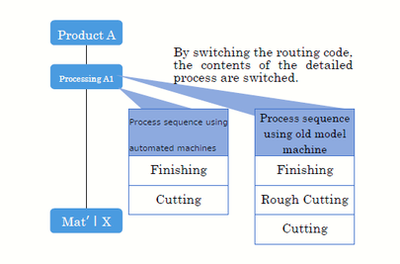
This option explodes production schedules into specific detailed processes (routing) such as cutting, turning, milling, and inspection, allowing for giving instructions for small tasks, managing progress, and collecting actual result time.
■ Explosion based on the Routing Master
If you set a "Routing Code" in the Item Master, the system refers to the settings of the Work Master and the Routing Master (setup time, standard time, work sequence) when schedule details are created, automatically exploding schedule data of detailed processes. If a part of a process involves outsourced work, specifying an outsourcing partner as the production location automatically creates data for issuing an outsourced processing request.
■ Individual setting of withdrawal timing【5.0】
The timing of inventory consumption can be set in detail for each item, such as "at the start of the first process" or "at the completion of a specific intermediate process," instead of the completion of items only.
■ Material arrangement according to the start of the process 【New】
TPiCS-X Ver 5.2 allows you to specify in a master which detailed process of the parent product shall use a child part in the structure. Based on this information, the f-MRP performs calculations for arrangement and develops a goods receipt schedule according to the scheduled start date of the relevant process. This prevents unnecessary early delivery of parts.
Issues Management Option 【Update】
Based on work instructions, the system creates "issue instructions" to move materials from specified storage locations to the site, achieving consistent management of accurate instructions for the site and actual movement results.
■ Efficient issue instructions
The system can create instruction data according to conditions, such as batch issues with specified order numbers of parent products or issues to replenish items exactly to make up for shortages, with consideration to the on-site inventory level. When it is combined with the Manufacturing Traceability option, an inventory lot is automatically selected based on first-in, first-out logic and recorded as traceability tracking data.
■ Free location issue supported【New】
Ver 5.2 supports multiple-warehouse and free-location operations. Using pre-set "priorities" or "issue group settings" based on physical distance, the system automatically determines the optimal storage location and creates instruction data for picking work.
Alternative Production Option

■ Automatic switching calculation for alternative production【5.0】
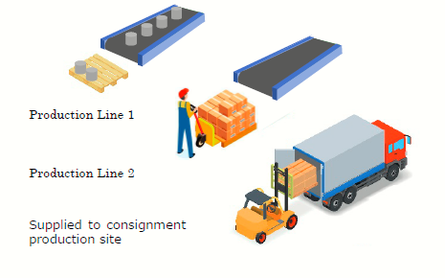
When a standard part is out of stock or difficult to procure, the system switches it to a substitute part registered in advance in the master and creates a production schedule. If a shortage of a standard part is detected during f-MRP calculations, it automatically checks the inventory of the substitute and continues allocation and arrangement calculations for the quantity that is equal to the shortage. This option can also be used for prioritizing the consumption of substitute parts nearing expiration.
Shop Floor Control Option 【Update】
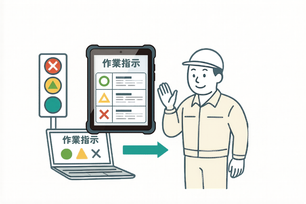
This function displays a list of the day's work instructions on the terminal screen at the site and communicates the status of material preparation and the progress of the preceding process to workers using ○, △, and × symbols (signals).
■ Determination logic for start possible mark
A circle (○) indicates that the process can be started for all quantities; an X indicates that the process cannot be started due to incomplete preceding processes or missing parts. A triangle (△) indicates that only some of the required parts are ready, and the process can be started for only a portion of the scheduled quantity. Operators start to work on the process marked with ○ on the screen. By using the preceding process button, you can check the detailed status of parts in shortage.
■ Accurate actual results management for multi-day shifts using DateTime Type【New】
TPiCS-X Ver 5.2 and later support the "DateTime type (actual date and time data)" management, which integrates date and time information, such as the completion date and time of actual results data. For example, in shifts that cross days, such as overnight shifts, by comparing the shift start/end times set in the system with the actual start/completion dates and times, you can separate "logical work day (e.g., the 3rd shift of the previous day)" from the "actual work date and time," allowing you to manage them accurately. Even cross-day shifts do not require manual correction. The system automatically collects accurate actual working hours (time elapsed from start to completion) and records actual results on the correct dates, significantly strengthening the foundation for precise cost calculation and labor management.
■ External linkage【5.1】
When an indication mark changes to ○ or when work is delayed, you can process the situation using linkage, such as by calling an external system program to illuminate a warning lamp or playing an announcement using a voice synthesis system.
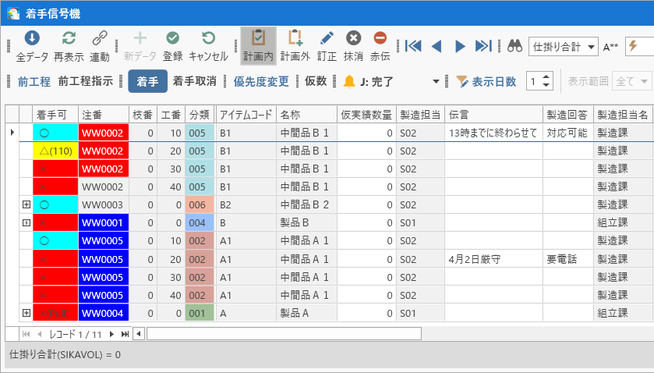
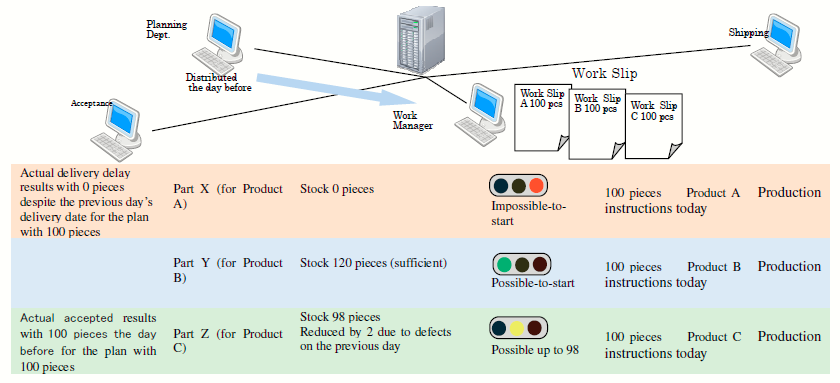
The Shop Floor Control option is a system that solves the problems behind the needs, rather than just meeting the needs that appear on the surface. Alternatively, it is a system that aims to perform true “management” in terms of “soil improvement” by removing the mess that leads to those problems, and enables the site to make the right decisions, rather than having the site put in the actual results to collect the actual results.
Manufacturing Traceability Option
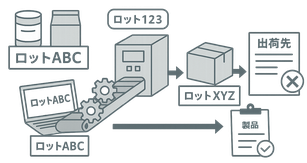
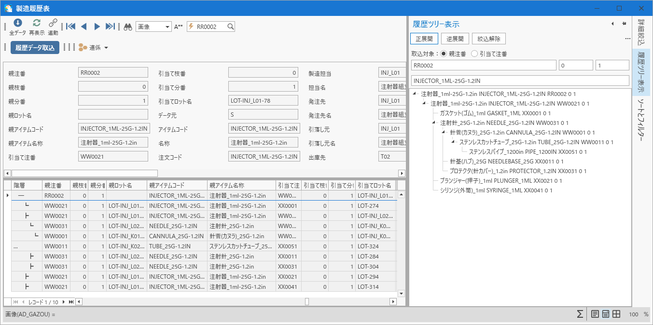
This function traces lots bi-directionally (investigation by tracking) upstream and downstream through the structure: from raw material lots to final product lots and from product lots back to raw material lots.
■ Setting of traceability classes
In the Item Master, the management class can be set individually for parent items (Yes/No/Advance lot allocation) and child items (Strict lot-managed/Lot record only). This reflects accurate lot information to the system during actual results entry. Besides, "Advance Lot Allocation" allows you to specify the lot to be used when a work instruction is issued, allowing for giving more detailed instructions to the site.
■ Linkage of expiration date management with f-MRP
A use-by date (e.g., expiration date) can be set for each lot to prevent accidental use of expired materials. Also, in f-MRP calculations, a calculation logic works to automatically subtract inventory on the expiration date, achieving arrangement calculations considering future stockout.
■ Long-term storage with history records
Massive amounts of traced data are preserved for a long time as a "Manufacturing history record" separate from daily transaction data. This prevents data bloat while allowing you to search and track data when a defect is found, even after a few years.
Resource Management Option 【Update】
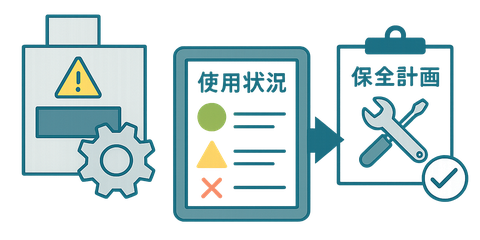
With this function, you can register "resources" such as equipment, molds, and jigs as masters, and link them with daily actual production results data to monitor usage status and develop maintenance plans.
■ Precise consumption settings
In the Resource Usage Master, resource consumption when items are produced can be set using three calculation methods: "Consumption Quantity" (consumed in proportion to production quantity), "Divided Consumption Quantity" (calculation for producing multiple pieces in one shot), and "Fixed Consumption Quantity" (consumption is constant regardless of production quantity). You can check future consumption projections on the Gantt chart.
■ Automatic development of maintenance plans【Update】
TPiCS-X Ver 5.2 features an additional logic to create the next maintenance plan triggered by a "cycle" such as a specified number of days or months, in addition to the timing when cumulative usage or shots reach a set limit (threshold).
■ Advanced linkage with production schedules【New】
In MRP calculations, TPiCS-X Ver 5.2 restricts the capability in a scheduled maintenance period and performs calculations to develop a production schedule, while automatically avoiding that period.
■ Automatic arrangement of maintenance materials【New】
When replacement parts and consumables required for maintenance are registered in a master, TPiCS-X Ver 5.2 creates a "Maintenance Withdrawal Schedule line" in the Production Schedule table. If a shortage of inventory is found by MRP calculations, a purchase order schedule for the part is automatically developed, and the inventory is withdrawn upon the registration of the actual maintenance results.
< Options to enhance system operations >
Transaction Interface Option 【Update】
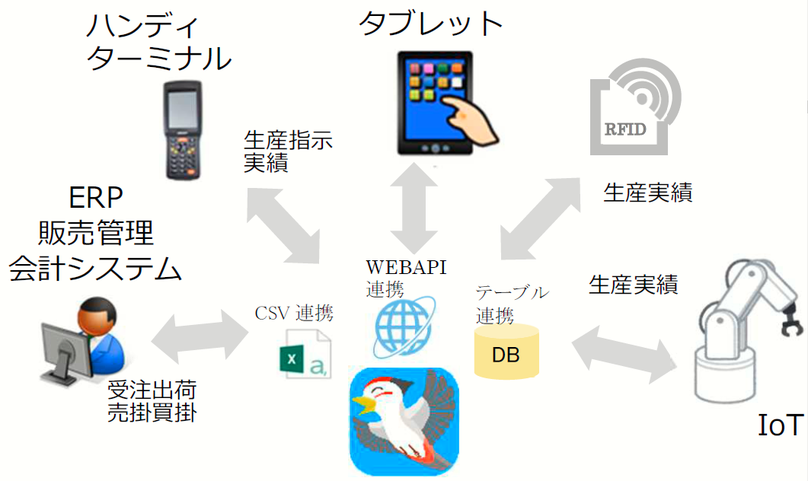
This option provides a communication gateway that connects database to external core systems or IoT devices. It processes data via automatic import tables and automatic export tables.
■ WebAPI as a service【New】
TPiCS-X Ver 5.2 features an architecture where the WebAPI processing function operates as an independent WebAPI Service. There is no need to keep the TPiCS running: it begins to accept processing in the background when the OS starts up.
■ Addition of concurrent execution user licenses【New】
A dedicated license has been added to TPiCS-X Ver 5.2. In the event of asynchronous, simultaneous access from multiple terminals, it executes processing, such as data registration and updates (POST commands), in parallel without generating wait times. When actual results are registered by automatic import, it performs exclusive control by locking record to prevent data inconsistency.
■ Real-time reference by GET commands【New】
TPiCS-X Ver5.2 supports GET commands, which are used to inquire from outside about current inventory levels or the progress of a production schedule, allowing you to acquire real-time data and hand it over to another system.
Internal Control Option
This is an audit function that records in detail the entire operation history of the system (who changed what value, when, and how).
■ Extended modification history target tables【5.0】
In TPiCS-X Ver 5.0 and higher, the target tables for modification history management are extended to comprehensively cover actual results of Mfg. No. schedules, issue instructions, resource management, and alternative production, as well as master tables. In addition, it allows you to exclude automatic updates by the system and acquire only the modification history directly entered by users.
■ Purchase order and quotation approval function【5.1】
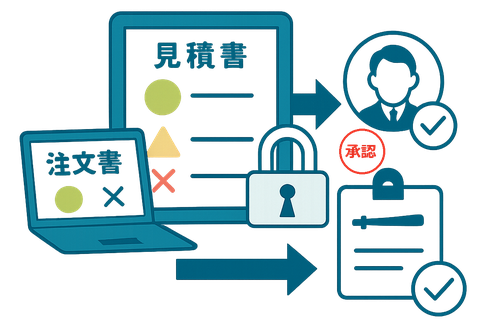
You can prohibit the output of purchase orders/work instructions and the input of actual results until an authorized supervisor approves them. In addition, TPiCS Ver. 5.1 and later support the approval of product quotations. An "approvable upper limit amount" can be set for each user's role, allowing you to establish a correct ordering and quotation process in place according to the job authority of each person in charge.
■ Data encryption lock
The system assigns an encrypted approval key to approved data and locks it. This prevents illegal tampering through direct access to the database from outside.
SCM Option
This function allows you to manage the supply chain by directly emailing order and forecast information from the system to suppliers and partner companies, as well as using linkage through bi-directional communication.
■ CSV linkage with terminal programs
The client is configured as the "Supply chain host," and the supplier as the "Supply chain terminal." Suppliers can use the demo version of TPiCS-X (free of charge) as a terminal, building an EDI environment without system investment. The system receives data sent from the host, enters replies about delivery date changes or quantity splits on the terminal, and sends the data to the host.
■ Importing reply data and reflecting into schedules
The system receives replies (same reply, delivery date change, partial delivery, quantity reduction, etc.) sent from suppliers and imports them into the Production Schedule table on the host. By executing MRP calculations, it detects through journals how delays in parts delivery or partial deliveries will affect your company's product assembly schedule, allowing for rapid rescheduling.